

If you have ever compared SMS vendors and seen “SMPP supported” listed as a feature, you have probably wondered what that actually means for your integration. SMPP is not a product. It is a messaging protocol, and understanding how it works will save you real time when you are evaluating an SMS gateway or trying to figure out why messages are stuck in a queue.
This guide breaks down what SMPP is, how the protocol moves messages between systems, the difference between an SMPP API and an HTTP API, and what actually matters when you are choosing an SMPP gateway or provider.
Quick Answer
Short Message Peer-to-Peer (SMPP) is a telecommunications industry protocol used to exchange SMS messages between an application, known as an External Short Messaging Entity (ESME), and a Short Message Service Center (SMSC). It runs over a persistent TCP/IP connection and is built for high-throughput, two-way SMS traffic. Telecom operators, SMS aggregators, and enterprises with large messaging volumes typically use SMPP instead of simpler HTTP APIs because it supports sustained connections, delivery receipts, and finer control over message flow.
Key Takeaways
- SMPP is a binary protocol built specifically for SMS, not a general purpose web API.
- It works over a persistent TCP/IP connection called a bind session, which stays open instead of reconnecting for every message.
- SMPP version 3.4, released by the SMS Forum, is the version most gateways and operators still support today.
- The default SMPP port is 2775, though many providers also offer connections on custom or TLS-secured ports.
- SMPP supports two-way messaging, meaning it can send and receive SMS, along with delivery reports.
- An SMPP gateway or provider sits between your application and the mobile network operators, handling routing, binds, and message translation.
What Is SMPP Used For?
SMPP is used to send and receive high volumes of SMS traffic between messaging applications and mobile networks. Telecom operators use it to interconnect with other carriers and aggregators. SMS aggregators use it to route traffic to multiple operators across different countries. Enterprises with large notification volumes, such as banks sending one-time passwords or logistics companies sending delivery updates, use SMPP when their message volume outgrows what a simple HTTP API can handle efficiently.
The protocol was originally developed in the 1990s for operator-to-operator SMS interconnection and later became the standard for application-to-person (A2P) messaging at scale. It is maintained conceptually under the SMPP specification first published by the SMS Forum, with version 3.4 remaining the most widely implemented version across SMSCs and gateways today.
Example: A regional bank in Southeast Asia sends around two million OTP messages a month across several mobile networks. Instead of opening a new HTTP connection for every OTP, the bank’s authentication system keeps a small number of SMPP bind sessions open with its SMS gateway provider. Each session can push hundreds of messages per second without the overhead of repeated connection handshakes, which matters when a login delay of even a few seconds affects the user experience.
How Does SMPP Work?
SMPP works by establishing a persistent connection between two systems, an ESME (your application or platform) and an SMSC (the system that actually delivers SMS to handsets, operated by a carrier or gateway provider). Once that connection is open, messages move back and forth as small binary data units called Protocol Data Units, or PDUs.
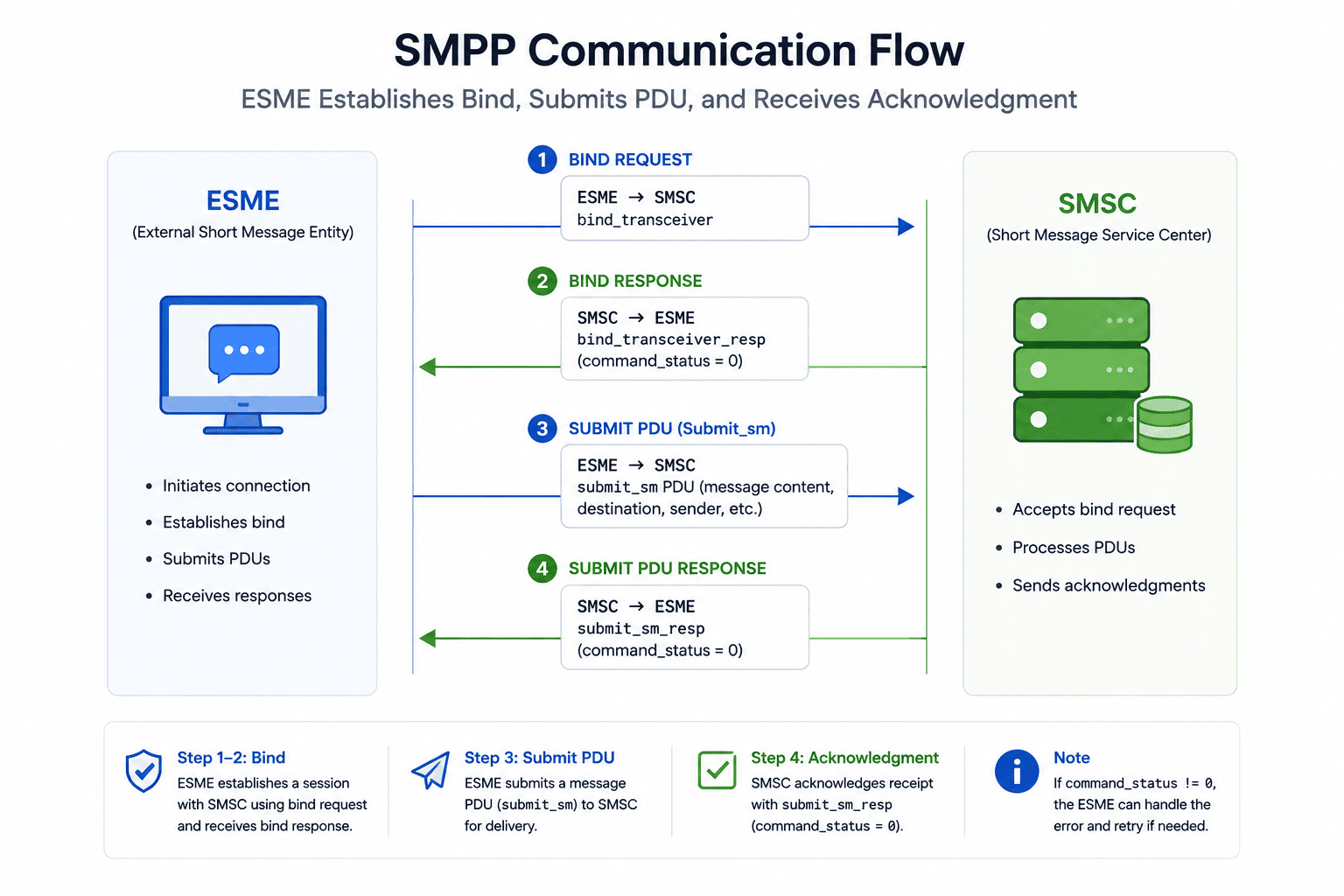
Here is the general sequence:
Step 1: Establish a bind
The ESME opens a TCP connection to the SMSC and sends a bind request, authenticating with a system ID and password.
Step 2: Submit or receive messages
Once bound, the ESME can send submit_sm PDUs to push outbound messages, or receive deliver_sm PDUs for inbound messages and delivery reports.
Step 3: Acknowledge each PDU
The SMSC responds to each request with a matching response PDU, confirming whether the message was accepted, queued, or rejected.
Step 4: Keep the session alive
Both sides periodically exchange enquire_link PDUs to confirm the connection is still active, since the session is meant to stay open for extended periods rather than reconnecting per message.
Step 5: Unbind when finished
Either side can close the session gracefully with an unbind request when the connection is no longer needed.
This design is why SMPP performs well under sustained, high-volume traffic. The connection overhead happens once, not on every message.
Understanding the SMPP Bind Session
A bind session is the core building block of SMPP, and it is also where most real-world integration problems show up. There are three bind types:
- Transmitter (TX): Used only to send messages to the SMSC.
- Receiver (RX): Used only to receive messages and delivery reports from the SMSC.
- Transceiver (TRX): Used for both sending and receiving over a single connection.
Most modern SMPP gateways support transceiver binds because it simplifies connection management. However, providers often set throughput limits per bind, measured in messages per second (commonly called TPS or MPS). If your application tries to push more traffic through a single bind than the provider allows, messages queue up or get throttled, which looks like a delivery delay but is actually a connection-level bottleneck.
Expert Insight: In practice, if an integration is hitting a throughput ceiling even though the SMSC reports capacity is available, the fix is often to open multiple binds rather than trying to force more volume through one connection. Most SMPP providers document a per-bind TPS limit specifically so clients scale horizontally across sessions instead of overloading a single one.
SMPP PDU Structure Explained
Every SMPP interaction is built from PDUs, and understanding their structure helps when you are debugging integration issues. A PDU has two parts:
| Component | Description |
| Header | Contains the command length, command ID (such as submit_sm or bind_transceiver), command status, and a sequence number used to match requests with responses |
| Body | Contains the mandatory and optional parameters specific to that command, such as sender ID, destination number, message text, and data coding scheme |
The mandatory parameters differ by PDU type. A submit_sm PDU, for example, includes the source address, destination address, message content, and encoding format such as GSM 7-bit or UCS-2 for messages containing non-Latin characters. Optional parameters, called TLVs (Tag-Length-Value), let you attach extra data like a message reference or a received delivery request without changing the core PDU structure.
SMPP vs SMTP
These two protocols are easy to confuse by name but serve completely different purposes.
| Aspect | SMPP | SMTP |
| Primary use | Sending and receiving SMS messages | Sending email messages |
| Data format | Binary PDUs | Text-based commands |
| Connection style | Persistent bind session | Connection typically opened per message batch |
| Delivery confirmation | Delivery receipts (DLRs) via deliver_sm | Bounce messages and read receipts (less standardized) |
| Typical users | Telecom operators, SMS aggregators, enterprise messaging platforms | Any application sending email |
The short answer to “how is SMPP different from SMTP” is that they are not really comparable except that both are protocols for peer-to-peer message exchange. SMPP is purpose-built for the SMS ecosystem, including operator interconnection and delivery tracking, while SMTP is built for email routing between mail servers.
SMPP API vs HTTP API
This is one of the most practical questions for anyone integrating SMS. Both let your application send messages, but they behave differently under load.
| Factor | SMPP API | HTTP API |
| Connection type | Persistent binary connection | Stateless request per message or batch |
| Best suited for | High-volume, continuous traffic | Lower to moderate volume, simpler integrations |
| Integration complexity | Requires an SMPP client library and bind management | Typically a REST call with an API key |
| Throughput control | Fine-grained, per-bind TPS management | Usually rate-limited by the provider at the account level |
| Two-way messaging | Native support via receiver or transceiver binds | Often requires webhooks for inbound messages |
| Common users | Telecom operators, SMS aggregators, high-volume enterprises | Startups, marketing platforms, lower-volume enterprise use |
Neither option is universally better. An HTTP API is usually faster to integrate and sufficient for moderate volumes. SMPP becomes worthwhile once your traffic is consistent and high enough that connection overhead and fine-grained throughput control start to matter, which is typically the case for aggregators and telecom-facing platforms rather than a single marketing campaign sending a few thousand messages a month.
What Port Does SMPP Use?
The default port for SMPP is 2775. This has been the conventional port since the protocol’s early adoption, though it is not enforced by the specification itself, meaning providers can and do configure alternate ports. Many gateways also offer SMPP over TLS on a separate port, commonly 3550 or a custom port assigned by the provider, to encrypt traffic between the ESME and SMSC. If you are troubleshooting a failed bind connection, confirming the correct port and whether TLS is required is one of the first things to check.
Can SMPP Handle Two-Way SMS Messaging?
Yes. SMPP was designed to support two-way SMS messaging from the start. A transceiver bind allows a single connection to both submit outbound messages and receive inbound messages or delivery reports. This is what makes SMPP suitable for use cases like customer support over SMS, two-way chat platforms, and interactive services such as SMS-based surveys or appointment confirmations, where a reply from the end user needs to route back to your application in near real time.
Example: A logistics company sends a delivery notification asking a customer to reply “1” to reschedule. The outbound message goes out through submit_sm. When the customer replies, the SMSC pushes that reply back to the same bound session as a deliver_sm PDU, and the company’s system parses the reply and triggers a rescheduling workflow automatically.
The Role of an SMPP Gateway and SMPP Provider
An SMPP gateway is the system that sits between your application and the mobile network operators, translating your SMPP or HTTP requests into actual message delivery across one or more carrier connections. An SMPP provider is the company that operates and maintains that gateway, along with the operator relationships, routing logic, and compliance handling behind it.
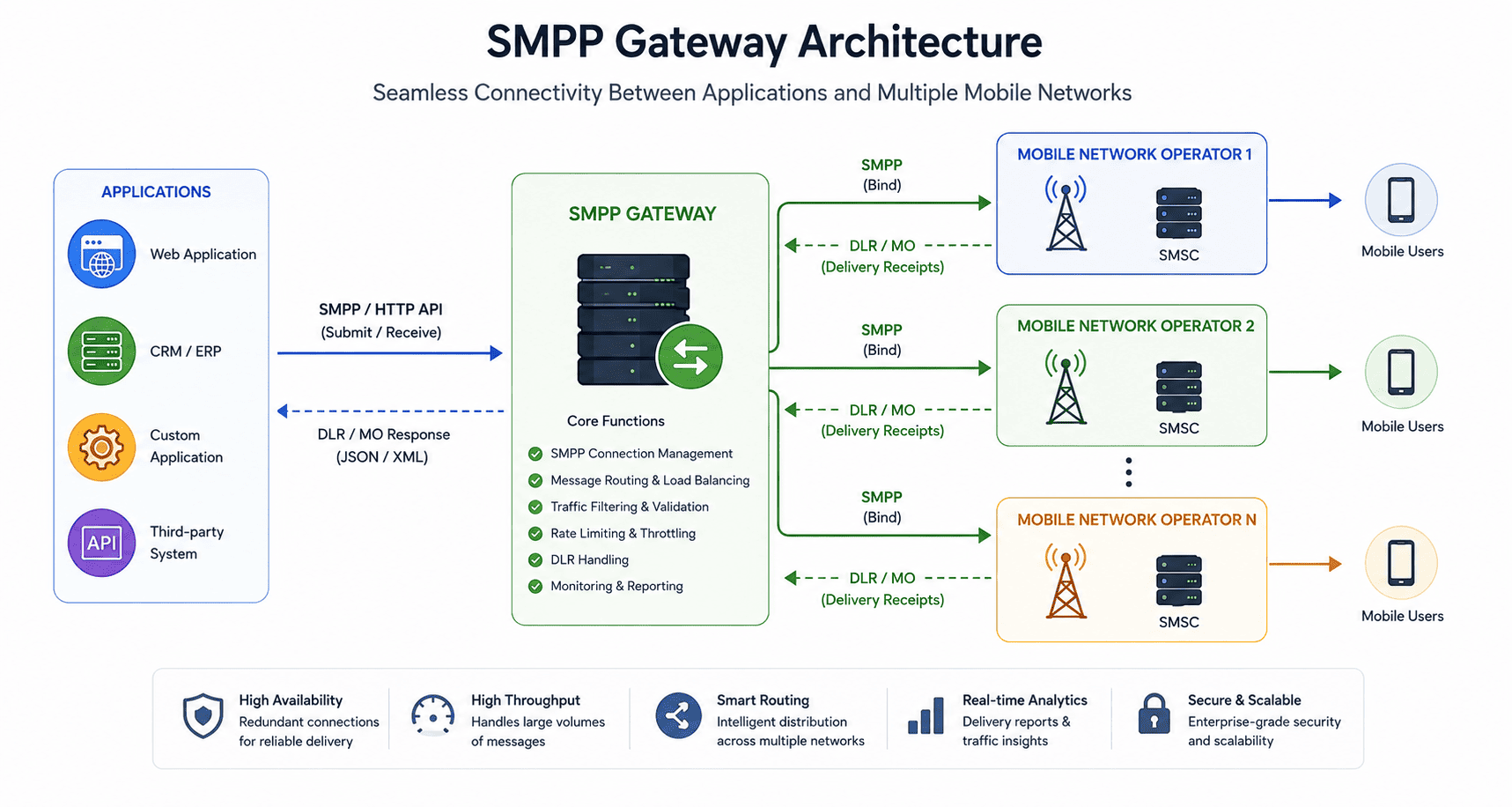
The provider’s job goes beyond just accepting your messages. It typically includes:
- Maintaining direct or aggregated connections to mobile network operators
- Applying least cost routing (LCR) or quality-based routing across multiple carrier paths
- Handling number formatting, sender ID registration, and regulatory requirements like 10DLC in the US or TRAI DLT rules in India
- Returning accurate delivery reports back through the bind
- Managing failover so traffic reroutes automatically if a primary route degrades
This is also where an SMS gateway platform becomes relevant for teams that need both SMPP for high-volume automated traffic and a simpler interface for smaller campaigns or two-way conversations. TeleOSS’s SMS Gateway Software is built to handle SMPP connections for bulk and application-to-person traffic while also supporting a two-way SMS chat platform for conversational use cases, so operators and enterprises are not forced to run separate systems for high-throughput and interactive messaging.
Benefits of Using SMPP
High throughput with lower overhead:
Because the connection stays open, SMPP avoids the repeated handshake cost of per-message HTTP requests, which matters when you are pushing thousands of messages per second.
Reliable delivery tracking:
Delivery receipts are a native part of the protocol, giving you a consistent way to confirm whether a message actually reached the handset.
Support for two-way messaging:
A single transceiver bind can send and receive, which simplifies architecture for conversational or interactive SMS use cases.
Granular routing and throughput control:
Providers can allocate specific TPS limits per bind, which gives large senders predictable capacity planning.
Wide industry support:
Most SMSCs, aggregators, and enterprise messaging platforms support SMPP 3.4, so interoperability between systems is generally well established.
Limitations and Challenges of SMPP
Integration complexity:
Setting up and maintaining SMPP binds requires more technical effort than calling a REST endpoint. You need a client library that handles connection state, reconnection logic, and PDU sequencing correctly.
Connection management overhead:
Bind sessions can drop due to network issues, provider maintenance, or throughput violations, and your application needs logic to detect this and reconnect without losing messages in transit.
Not ideal for low volume:
If you are sending a few hundred messages a month, the operational overhead of managing SMPP binds usually is not worth it compared to an HTTP API.
Security considerations:
Standard SMPP traffic is not encrypted by default. TLS-secured connections are available from most providers, but you need to confirm this is configured correctly rather than assuming it.
Fraud exposure:
High-throughput connections are also a target for artificially inflated traffic (AIT) fraud and grey route abuse if routing and monitoring are not managed carefully by the provider.
How to Choose an SMPP Gateway Provider?
Choosing between SMPP providers comes down to a handful of concrete evaluation points rather than marketing claims. Consider:
- Direct operator connections versus resold routes: Direct connections generally mean better reliability and delivery reporting accuracy than routes resold through multiple intermediaries.
- TPS and bind limits that match your traffic: Ask what throughput you get per bind and whether you can scale by adding more binds as volume grows.
- Delivery report accuracy: Ask how DLR status is sourced, since some providers report submission to the SMSC as “delivered,” which is not the same as confirmed handset delivery.
- Failover and redundancy: Confirm whether the provider automatically reroutes traffic if a carrier route fails, and how that is tested.
- Compliance support: For US traffic, ask about 10DLC and The Campaign Registry (TCR) registration support. For other regions, ask about local regulatory requirements such as sender ID registration or content filtering rules.
- Support for both SMPP and HTTP: If your traffic mix includes both high-volume automated sends and smaller interactive campaigns, a provider offering both an SMPP gateway API and a straightforward HTTP API gives you flexibility without managing two vendors.
Common Mistakes to Avoid
Running a single bind for all traffic types
Mixing transactional OTPs with bulk marketing traffic on one bind can cause time-sensitive messages to queue behind lower-priority sends. Separate binds by traffic priority where the provider allows it.
Ignoring enquire_link handling
If your client does not respond to or send keep-alive PDUs correctly, the SMSC may drop the session as inactive, causing intermittent and hard-to-diagnose outages.
Assuming “sent” means “delivered.”
A successful submit_sm response only confirms the SMSC accepted the message, not that it reached the handset. Always track the final DLR status.
Skipping encoding checks
Sending messages with special characters using GSM 7-bit encoding instead of UCS-2 can cause message corruption or unnecessary message concatenation, increasing both cost and delivery risk.
Underestimating throughput needs during signup
Choosing a low TPS tier to save cost and then hitting a wall during a traffic spike, such as an OTP surge, is one of the most common and avoidable integration problems.
Best Practices for SMPP Integration
- Use a well-maintained SMPP client library rather than building PDU handling from scratch, unless your team has specific reasons to.
- Implement automatic reconnection logic with exponential backoff for dropped binds.
- Monitor bind status and DLR success rates continuously, not just at initial setup.
- Separate binds by message type or priority when your provider supports it.
- Confirm TLS is enabled if you are transmitting sensitive content like OTPs or account information.
- Load test at your expected peak TPS before going live, not just average volume.
Conclusion
SMPP remains the backbone protocol for high-volume SMS messaging because it was built specifically for that job: persistent connections, native delivery tracking, and support for two-way traffic at scale. Whether you are a telecom operator interconnecting with other carriers, an aggregator routing traffic across regions, or an enterprise sending high volumes of transactional messages, understanding how binds, PDUs, and throughput limits actually behave will help you evaluate providers more accurately and troubleshoot issues faster when they come up.
If you are weighing whether your current setup needs SMPP, or you are evaluating gateway providers for an upcoming migration, TeleOSS’s SMS Gateway Software supports SMPP connections alongside HTTP API and two-way SMS chat capabilities, so you can match the connection type to the traffic instead of forcing everything through one integration path. You can review the technical documentation or reach out to discuss your specific throughput and routing requirements.
FAQs
What is SMPP used for in telecom?
SMPP is used to exchange SMS messages between applications and SMS infrastructure, including operator-to-operator interconnection, aggregator routing, and enterprise application-to-person messaging such as OTPs, alerts, and marketing campaigns.
How is SMPP different from SMTP?
SMPP is a binary protocol built specifically for SMS exchange over a persistent connection, while SMTP is a text-based protocol built for routing email between mail servers. They solve different problems and are not interchangeable.
What port does SMPP use by default?
The default SMPP port is 2775. Many providers also support SMPP over TLS on a separate port for encrypted connections, so it is worth confirming the correct port with your specific provider.
Can SMPP handle two-way SMS messaging?
Yes. A transceiver bind supports both sending and receiving messages over the same connection, making SMPP suitable for two-way SMS use cases like customer replies, surveys, and conversational messaging.
What is the role of an SMPP provider in SMS routing?
An SMPP provider maintains connections to mobile network operators, applies routing logic such as least cost or quality-based routing, handles regulatory requirements, and returns delivery reports back to the sender through the bind session.
Do I need SMPP if I already use an HTTP API?
Not necessarily. If your volume is moderate and your use case does not require fine-grained throughput control, an HTTP API is often simpler to maintain. SMPP becomes more valuable as volume and reliability requirements increase.